

Monday, January 4, 2010
Inspiration Is Out There
Even though I've been taking it easy over winter break, I'm still constantly looking for examples of cool hair simulation (even though it's not real-time). For example, Susan (from Monsters vs. Aliens) had some pretty cool hair. Kept me interested in the movie. ;-)


Monday, December 14, 2009
Remaining Goals (and Timeline)
Edit (2/5/10): I removed goals that no longer apply to the project --> Remember Option 2 from the post that precedes this one? I'm going to take it, except I'm also going to assume that such a method of point cloud translation/rotation extrapolation already exists. In other words, my project pipeline takes as input the position/orientation of a single point located at the center of the cloud that represents the cloud's net movement. If I have time towards the end of the semester (which...I hate to say it, is doubtful), I will re-add developing the extrapolation method as a goal.
I'll continue to fill in and modify this list over the next week...I'm not really sure how things will be going for me by the time I get to the rendering part of the project, so it's difficult to plan that far ahead. :-/ I found a (semi) new resource for rendering, though - NVIDIA Real Time Hair SIGGRAPH Presentation. Unfortunately, this presentation is a bit discouraging in the sense that most of it showcases the latest GPU technology, which I can't tap into at the moment (nor do I think I ever could, since they mention Direct3D11! I only have 9...).
| Goal | Time Required for Completion | Priority (on a scale of 1 to 10) |
|---|---|---|
| Grow key hairs out of the scalp mesh according to a procedurally generated vector field (user will input the local axes of the scalp mesh) | 2 days | 8 |
| Adjust key hair soft body values until they behave more like real hairs | 1 day | 10 |
| Bring the Bullet code over to my OpenGL framework (i.e. render Bullet's physics bodies myself instead of letting Bullet's Demo Application class do everything) | 7 days | 10 |
| Tessellate the key hairs using B-splines | 14 days | 5 |
| Use interpolation ("multi strand interpolation") between key hairs to grow and simulate filler hairs | 14 days | 8 |
| Build strips (and clusters) around each control and filler hair | 5 days | 9 |
| Implement the Marschner reflectance model to render/color a polygonal strip of varying width | 21 days | 8 |
| Implement the Kajiya shading model to render/color a polygonal strip of varying width (based on results, choose the "better" method, or somehow combine the two) | 21 days | 7 |
| If the chosen model doesn't color wider strips realistically, modify the renderer so that it interprets 1 wide strip as X skinny strips (perhaps using an opacity/alpha map) | 14 days | 6 |
| Implement the (modified) chosen model to render/color a 3d polygonal cluster | 10 days | 8 |
| ... | ... | ... |
I'll continue to fill in and modify this list over the next week...I'm not really sure how things will be going for me by the time I get to the rendering part of the project, so it's difficult to plan that far ahead. :-/ I found a (semi) new resource for rendering, though - NVIDIA Real Time Hair SIGGRAPH Presentation. Unfortunately, this presentation is a bit discouraging in the sense that most of it showcases the latest GPU technology, which I can't tap into at the moment (nor do I think I ever could, since they mention Direct3D11! I only have 9...).
Perhaps it is time for a different approach (yet again)
Greeting, friends. Over the weekend, I've been trying to use Bullet to do the following:
The way I see it, there are 3 directions I can take from here:
For those of you who don't know, I am going to try to continue this project into next semester - in other words, apply for an "Incomplete" and finish it at a later point. This is a relief, seeing as, as it stands, the project is nowhere near worthy for judging eyes. In order to successfully apply for an "Incomplete" however, I need to list out my remaining goals for the project and give an approximate time line for accomplishing them. My next post will consist of this time line - seeing as I did a poor job with predicting how long my project goals would take to complete, I'm going to ask for some planning advice this time. I have my list of goals, I just don't know how much time I should allot to them. :-/
Expect an update later tonight!
- Break down an input head mesh (.obj) into multiple convex hulls (check!)
- Deform the vertices of the hulls and tell every other colliding object in the scene about the deformation so that they will collide with the deformed convex hulls instead of the original ones (check!)
- Add key hair soft bodies to the scene according to the topology of another .obj mesh (check!)
- Anchor the key hair soft bodies to the convex hulls (check!)
- Deform the vertices of the hulls and tell the key hair soft bodies about the deformation so that they will collide with the deformed convex hulls instead of the original ones (not so much...)
The way I see it, there are 3 directions I can take from here:
- Keep looking for a way to hack the soft body key hairs so that they recognize the vertex deformations - if the rigid bodies can do it, then there has to be a way for the soft bodies to do it!
- Take a step back and contextualize what I'm trying to accomplish. This hair is going to go on a virtual character who will nod and shake his/her head. Even though all I have access to is individual vertex positions over time (i.e. key frame data), perhaps there is a way to extrapolate rotation data for the entire mesh by analyzing the net movement of its vertices over time. Bullet will be happy to rotate the convex hulls for me, and the key hair soft bodies can recognize this kind of movement on a larger scale (a transform applied to the convex hulls instead of their vertices). I did some testing to prove this:
(In this screen shot, I'm moving my mouse back and forth to call ->setImpulse() on the convex hull - there's just 1 convex hull and only 60 hairs to maintain simulation speed, but you get the point. The key is that ->setImpulse() looks at the convex hull as a single body to which a single transformation matrix is applied - individual vertiex positions are not being altered). - Create my own soft body key hairs and give them some thickness. At the moment I am modeling/simulating the key hairs as collections of 2d links with soft body physics applied to them (i.e. some deformation and bounciness is permitted). Please note I was not 1337 enough to create these myself - I modified one of Bullet's soft body primitives (rope). If I were to bring these links into the 3rd dimension, however, maybe this would make their collisions more robust and, as a result, force them to recognize the tiny vertex deformations of the convex hulls. I think I could go about doing this by either (a) joining together some rigid body cylinders or (b) joining together some soft body trimeshes (this would involve building a trimesh "cylinder" out of soft body patches). The downside to (a) is that I lose the deformation and springiness of soft body physics. As we all know, hair bounces just slightly and does indeed stretch slightly as well (maybe not to the degree that I have them bouncing above, but it still yields a more realistic approach than stiff sticks connected together).
For those of you who don't know, I am going to try to continue this project into next semester - in other words, apply for an "Incomplete" and finish it at a later point. This is a relief, seeing as, as it stands, the project is nowhere near worthy for judging eyes. In order to successfully apply for an "Incomplete" however, I need to list out my remaining goals for the project and give an approximate time line for accomplishing them. My next post will consist of this time line - seeing as I did a poor job with predicting how long my project goals would take to complete, I'm going to ask for some planning advice this time. I have my list of goals, I just don't know how much time I should allot to them. :-/
Expect an update later tonight!
Friday, December 11, 2009
Attaching Hair (First Attempt)
My original plan was to add one "key hair" (Bullet soft body rope) to the center of each tri-face in an input scalp mesh (.obj). However, with 256 ropes to create, Bullet was not happy. The following is what I got, which looks fine in a static screen shot, but believe me, the application was not running in real-time.
 So, I knocked the number of hairs down (for testing purposes) to 10, changed some property values, and took a closer look.
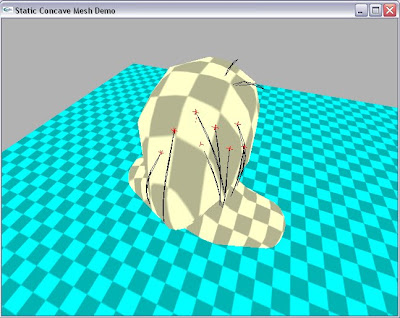 As you can see, there are some "in-grown" key hairs that are growing into the head (the two sprouting out the back) instead of away from the head along a face normal. My next step will be to investigate why the faces of the scalp .obj are not being exported such that (pt2-pt1)^(pt3-pt1) = the proper face normal direction. Then, from there, I'll begin to dabble in ways to speed things up...
EDIT: The in-grown hairs issue was my own fault...coding typo, if you will. Here's what I have after that fix (and with restitution bumped up to give the hairs a bit of stiffness near their roots).
 But the question still remains... what is the maximum number of key hairs that Bullet can handle in real time? I'll need to start with that number of hairs and interpolate between them to create the illusion of density. The only problem is, what if the maximum number is something like 5? Eeek!
 So, I knocked the number of hairs down (for testing purposes) to 10, changed some property values, and took a closer look.
 As you can see, there are some "in-grown" key hairs that are growing into the head (the two sprouting out the back) instead of away from the head along a face normal. My next step will be to investigate why the faces of the scalp .obj are not being exported such that (pt2-pt1)^(pt3-pt1) = the proper face normal direction. Then, from there, I'll begin to dabble in ways to speed things up...
EDIT: The in-grown hairs issue was my own fault...coding typo, if you will. Here's what I have after that fix (and with restitution bumped up to give the hairs a bit of stiffness near their roots).
 But the question still remains... what is the maximum number of key hairs that Bullet can handle in real time? I'll need to start with that number of hairs and interpolate between them to create the illusion of density. The only problem is, what if the maximum number is something like 5? Eeek!
Monday, December 7, 2009

There we go...
Problem resolved. How?
- Restarted my computer.
- Used a less efficient (but more stable) function for recalculating the bounding structure of the convex hull pieces (refitTree() instead of partialRefitTree()) at each time step.
The blue portion shows the mesh (.obj) that I fed into the program. As you can see, the convex hull approximation isn't bad at all! Here's a screenshot of the input mesh:
 Obviously I had to decimate the original (the one Cat gave me) to obtain this semi-dense starting point. The convex hull decomposition library seems robust enough to generate hulls given the original .obj as input. However, it takes a long time to do so, so I'll use this semi-reduced version for testing purposes. Additionally, there is still the issue of creating a mapping from the vertices of the convex hulls to the vertices of the original mesh (in order for the head collider to accommodate deformations in the original). But for now, it's time to move on to making those LODs! I'm going to look into Bullet's btSoftBody class to see if it can help at all...
 Obviously I had to decimate the original (the one Cat gave me) to obtain this semi-dense starting point. The convex hull decomposition library seems robust enough to generate hulls given the original .obj as input. However, it takes a long time to do so, so I'll use this semi-reduced version for testing purposes. Additionally, there is still the issue of creating a mapping from the vertices of the convex hulls to the vertices of the original mesh (in order for the head collider to accommodate deformations in the original). But for now, it's time to move on to making those LODs! I'm going to look into Bullet's btSoftBody class to see if it can help at all...
Sunday, December 6, 2009
Bullet: A Blessing and a Curse
Hello again. Things are progressing very slowly, but I still wanted to show you what I've been up to. Remember the issue about the cubes that passed right through the head mesh collision shape? Well, I've scoured the Bullet forums and even posted my own questions regarding the issue, but the problem is still mostly unresolved. However, in the process of trying to figure out what was going on, I've come across a method of optimization for creating the head collision shape. Using an open-source convex hull decomposition library (see here), I've managed to break down an originally semi-dense head mesh OBJ into several convex hull shapes, which I can then combine together (unfortunately, converting the original extremely dense OBJ takes a *very* long time - but I'm hoping the convex hull decomposition step will replace my need for a decimation via Maya step in the application pipeline):
 Notice how this knocks things down from one huge AABB to multiple smaller AABBs, which is a better approximation for the head mesh and will hopefully speed things up later on. Unfortunately, attempting to recompute the smaller AABBs at each frame (as the head mesh deforms) has become tricky. I was able to do it easily with just one, but with multiple, Bullet throws errors. I don't think it should take me too long to resolve the issue, though.
I think the most probable explanation for why some cubes *still* want to pass through the head mesh (even though it has been optimized) is due to a computation bug with co-normal collisions. When I shoot cubes along the normal of a particular face, that's when (I think, anyway) the collision fails to register. One solution could be to generate a small box at the center of each face. But that just means even more shapes to check, so I don't know. I suppose some particles going inside the collider isn't a bad thing *if* they can come back out (i.e. 1-way collisions). However, Bullet doesn't have that feature built-in (I would have to code it myself). At the end of the day, I feel kind of silly for spending so much time on something that isn't even hair... So I think I'll just put this issue aside for now. Things don't look very promising in terms of finishing the project by the 18th, but I'll keep putting it as one of my top course priorities.
Another update to come later tonight / tomorrow morning!
 Notice how this knocks things down from one huge AABB to multiple smaller AABBs, which is a better approximation for the head mesh and will hopefully speed things up later on. Unfortunately, attempting to recompute the smaller AABBs at each frame (as the head mesh deforms) has become tricky. I was able to do it easily with just one, but with multiple, Bullet throws errors. I don't think it should take me too long to resolve the issue, though.
I think the most probable explanation for why some cubes *still* want to pass through the head mesh (even though it has been optimized) is due to a computation bug with co-normal collisions. When I shoot cubes along the normal of a particular face, that's when (I think, anyway) the collision fails to register. One solution could be to generate a small box at the center of each face. But that just means even more shapes to check, so I don't know. I suppose some particles going inside the collider isn't a bad thing *if* they can come back out (i.e. 1-way collisions). However, Bullet doesn't have that feature built-in (I would have to code it myself). At the end of the day, I feel kind of silly for spending so much time on something that isn't even hair... So I think I'll just put this issue aside for now. Things don't look very promising in terms of finishing the project by the 18th, but I'll keep putting it as one of my top course priorities.
Another update to come later tonight / tomorrow morning!
Subscribe to:
Posts (Atom)
